The Tracklified Chrome extension does two things:
- Matches receipts to your credit card charges on supported bank/card websites — see which charges you have receipts for without leaving the page.
- Saves receipts from images, PDFs, and Gmail messages you're looking at.
Install from the Chrome Web Store →
Matching
Open your bank statement online. Charges that match a receipt in your Tracklified account are marked with a Tracklified indicator. Hover for a quick preview, click to open the receipt.
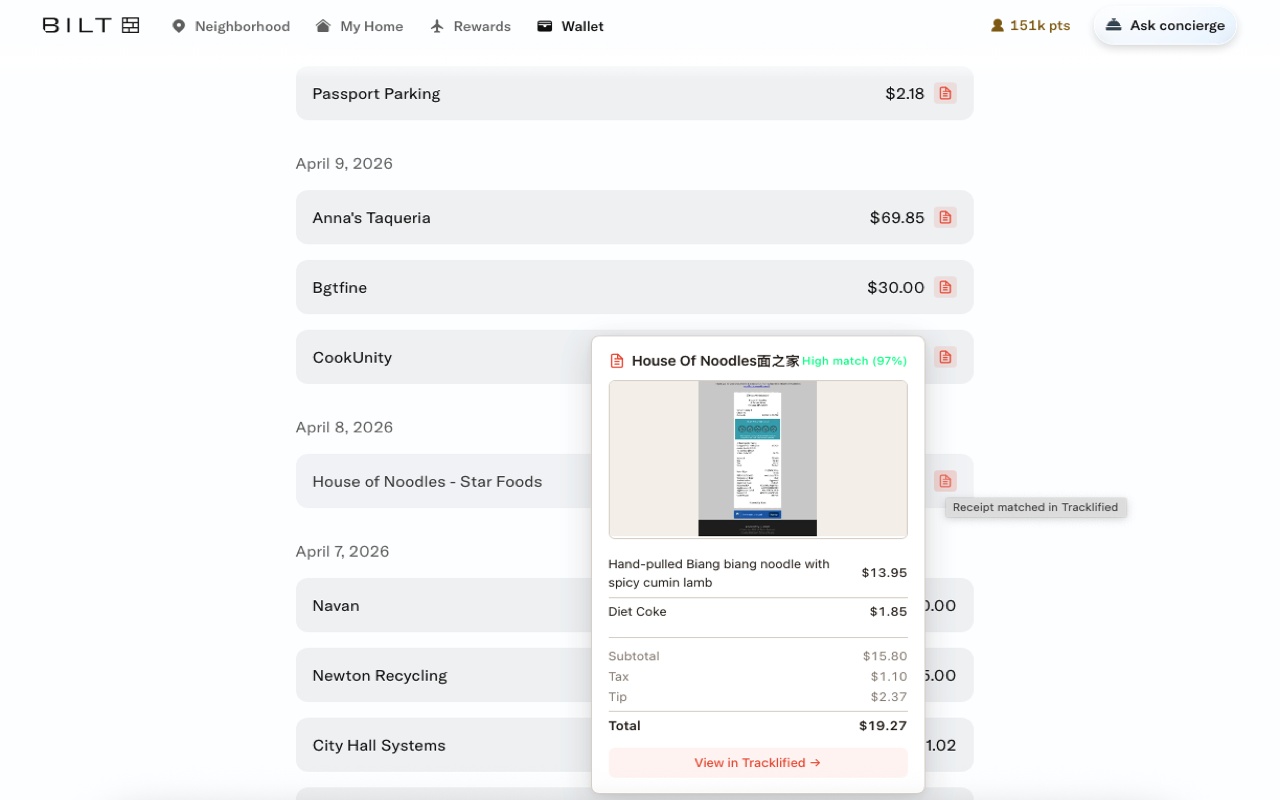
See Matching receipts to credit card charges for how matching scores are calculated.
Saving receipts
Right-click a receipt image or PDF page and pick Add to Tracklified. The file uploads and gets processed the same way as a photo or email forward.
In Gmail's message view, the extension adds Save email as Tracklified receipt to save the whole message as a receipt.
Scope
- Automatic matching runs on supported bank/card sites.
- Gmail message view — the save-email action.
- Image and PDF pages (including local
file://pages) — right-click Add to Tracklified. tracklified.com— auth bridge so the extension knows you're signed in.- Current tab, on demand — if you open the extension popup and click Scan this page for transactions or Report incorrect receipt matching, the extension accesses the active tab to do that specific job.
Outside those cases, the extension isn't reading pages.