The Tracklified Chrome extension pairs your credit card charges with matching receipts in your Tracklified account.
Install from the Chrome Web Store →
What you see
Open your bank or credit card statement online. Next to each charge, the extension indicates when Tracklified has a matching receipt.
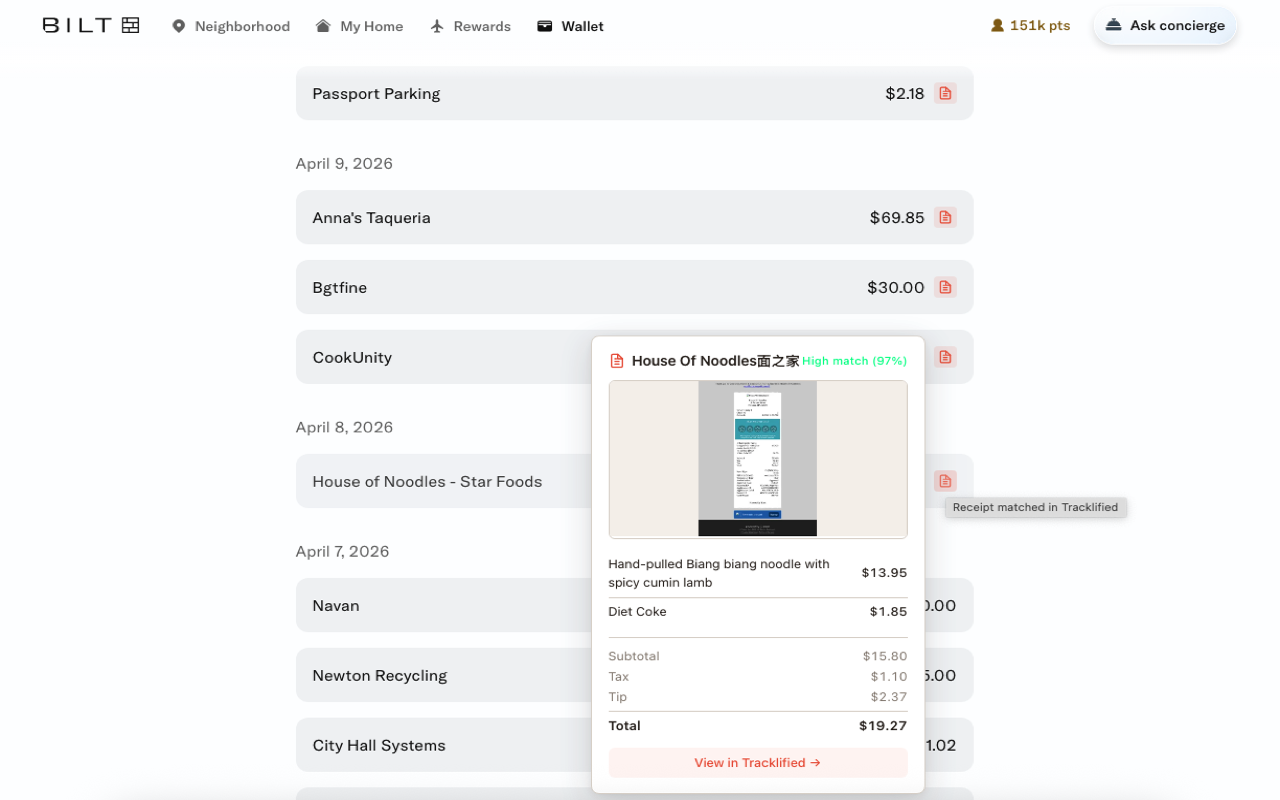
Hover to preview. Click through to see line items, merchant details, and the original image.
How matching works
Match scoring runs server-side against your receipts. Three signals contribute:
- Amount — the charge total must match the receipt total exactly.
- Merchant similarity — fuzzy match, tolerant of "SQ *STORE NAME" vs "Store Name" variants.
- Date proximity — transaction date within a few days of the charge settlement.
The in-page UI that shows matches next to charges is provided by the Chrome extension.
When a charge doesn't match
If a charge has no matching receipt, it's either:
- A receipt you haven't captured yet — snap it, upload it, and it'll show up
- A subscription or recurring charge without a per-transaction receipt
- A receipt where the amount is off (e.g., tax/tip rounding) since amount is an exact-match signal
Privacy
The extension operates on supported bank/card pages for matching. See Chrome extension for its full scope. Match lookups only query against your own receipts.